Know tonight if labour is running over.
You run one restaurant and spend most of the night on the floor. Worksauce puts sales and wages side by side as the night goes, so you see labour as a share of sales before close, not weeks later when the accountant's numbers arrive.
Sample figures
The roster was written last week. Tonight is happening now.
-
It's quieter than the roster expected
Rain, a table of twelve that cancelled, a slow Tuesday. Everyone you rostered still turns up, and you're too busy running food to work out what it's costing.
-
You find out weeks later
Labour % shows up when the accountant sends the month through. By then you've paid for every slow night in it.
-
Next week is a copy of last week
Writing a roster from scratch takes a night you don't have, so last week's goes out again, slow shifts and all.
Sales against forecast, and what the wages are doing to them.
The daily view shows tonight's forecast, sales so far, the gap between them, and labour as a share of sales, with every hour charted from open to close. Sales come in from your point of sale every five minutes.
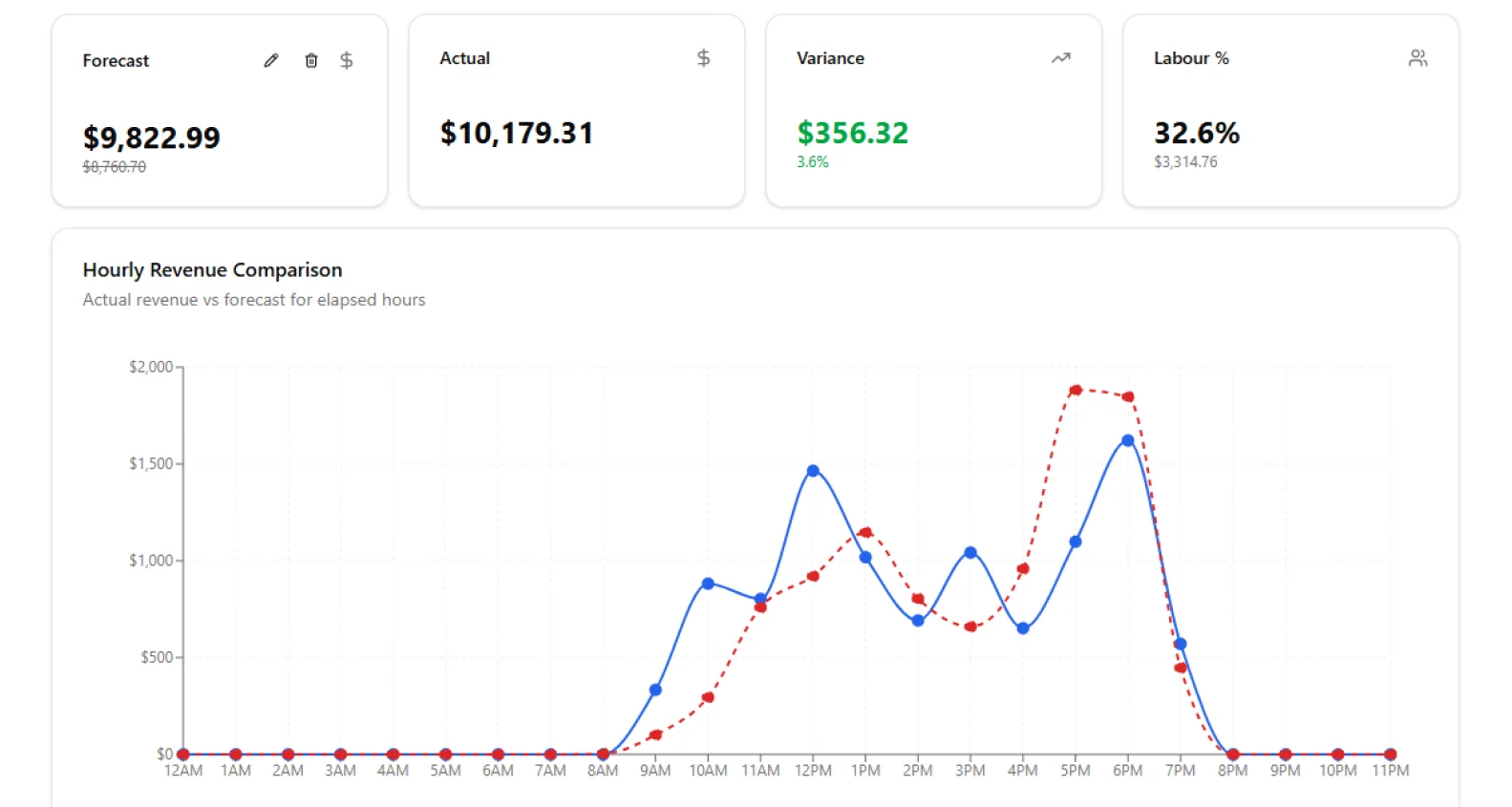
- Tracking adds the forecast for the hours left to the sales so far, so you can see where the night will land.
- Worksauce costs each shift from the hours worked and the person's pay, penalty rates and on-costs like super and payroll tax included.
- Compare tonight with the forecast, the same night last week or the same night last year.
See which part of the restaurant is running heavy.
Give each section its own labour target. Worksauce colours each one green, amber or red against it, so you know whether the kitchen or the floor has one too many on.
| Section | Revenue | Labour | Labour % | Target |
|---|---|---|---|---|
| Kitchen | $3,420 | $1,128 | 33.0% | 30% |
| Floor | $2,610 | $574 | 22.0% | 24% |
| Bar | $1,380 | $317 | 23.0% | 22% |
| Total | $7,410 | $2,019 | 27.2% | — |
Sample figures
| Day | Forecast | Rostered | Labour % | Hours | Stretch |
|---|---|---|---|---|---|
| Mon | $3,800 | $1,180 | 31.1% | 44h | 37h |
| Tue | $3,600 | $1,020 | 28.3% | 38h | 36h |
| Wed | $4,400 | $1,150 | 26.1% | 43h | 41h |
| Thu | $5,900 | $1,560 | 26.4% | 58h | 55h |
| Fri | $9,200 | $2,410 | 26.2% | 89h | 86h |
| Sat | $10,400 | $2,690 | 25.9% | 99h | 96h |
| Sun | $7,100 | $2,150 | 30.3% | 72h | 62h |
Sample figures
Check the roster against the week before anyone works it.
Worksauce starts each day's forecast from the same day over the last five weeks, leaving public holidays out. Change it when you know something it doesn't, like a private function or grand final night. Roster in Tanda, Deputy or Employment Hero as usual, and the rostered wages for each day show up against the forecast and your target.
- ✓Rostered wages and labour % for each day, against your target
- ✓The Stretch line averages the hours on your two leanest days of that weekday in the past year when sales came within 10% of this forecast, or your average for that weekday if none came close
Your point of sale and your rostering system.
Sales come from Square or Lightspeed. If your point of sale is something else, upload your sales as a CSV file instead. Rosters and timesheets come from Tanda, Deputy or Employment Hero.
Labour % of sales, by the hour and by section
Questions from restaurant Owners
More on connecting your systems, setup and your data in the FAQ, or ask us.
Does it work for one restaurant?
Yes. One restaurant is one site in Worksauce, with its own sections, labour targets and on-costs. Nothing needs a second venue.
How up to date are the numbers during service?
Sales from Square or Lightspeed come in every five minutes, and the daily view refreshes every minute while you have it open.
Where does the forecast come from?
Your own sales. Worksauce averages the same day over the last five weeks, leaving out public holidays, and spreads it across the hours the way your sales usually fall. You can change any day's forecast, or set it hour by hour.
Does the forecast use bookings or the weather?
No. Worksauce builds it from your sales history alone. If you know a big booking or a wet night is coming, change the forecast for that day.
Can the kitchen and the floor have different labour targets?
Yes. Each section has its own target as a percentage of sales, and you can change it for a particular week.
What do I need to connect?
A point of sale and a rostering system. Sales come from Square or Lightspeed, or a CSV upload, and rosters and timesheets from Tanda, Deputy or Employment Hero.
See your own numbers.
We'll walk you through it with your own Award and your own systems in mind.
By submitting you agree to our Privacy Policy.