Don’t wait for a notice to produce to check your pay.
The Awarditor checks what each person was paid against what their Award says they should have been paid, every pay period. You see the gap, who it affects and the back-pay owed, before anyone else finds it.
| Employee | Period | Reason | Gap |
|---|---|---|---|
| Priya N. | 15–21 Sep | Sunday penalty rate | −$36.48 |
| Leah M. | 15–21 Sep | Overtime after 38 hours | −$12.10 |
| Tom W. | All periods | Higher duties on weekends | Checked |
| Sam K. | All periods | — | $0.00 |
Most underpayments aren’t deliberate. The business still owes them.
-
A notice to produce arrives
The Fair Work Ombudsman asks for your time and wage records. You have to show what each person was paid and why, and most businesses have never checked.
-
Payroll was set up once
Award rates move every 1 July and people change roles. A payroll setting made years ago keeps paying the old way, and nothing tells you.
-
Small misses add up
A missed Sunday penalty, overtime after 38 hours, a break that never happened. A few dollars a shift, on every shift, for every pay period nobody notices.
How the Awarditor checks your pay
From your systems to a report in four steps. After that, every pay run is checked as it lands.
Onboarding
Connect your systems and confirm each staff member's Award and classification.
Calculation
Every shift costed against the Award: penalties, overtime, allowances, breaks.
Reconciliation
Calculated against paid, by person and by pay period.
Management
Back-pay worked out, and checks on every pay run from then on.
Set up in a conversation, not a 40-field Excel
Worksauce reads your staff from the systems you already use and proposes an Award, classification, employment type and allowances for each one. You check the list and correct whatever looks off, in plain English.
- ✓Connect rostering, payroll and accounting in a few clicks
- ✓Review suggestions person by person
- ✓Get your first compliance report the same day
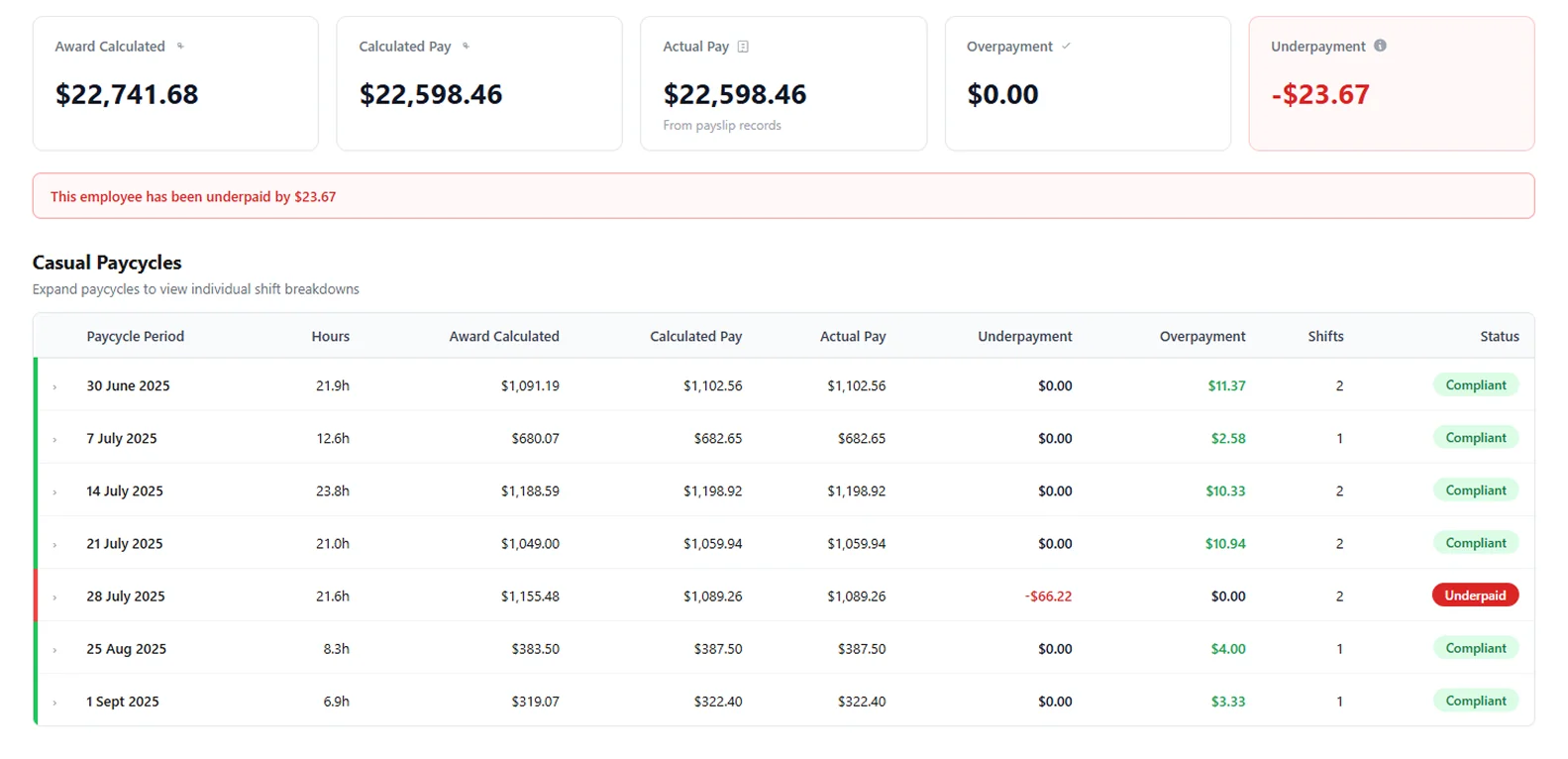
See which pay cycle was short, and by how much.
Open a person to see each pay cycle: hours worked, what the Award calculates, what payroll calculated, what was actually paid and the difference. Open a pay cycle to see the shifts behind it.
- ✓Every minute worked, read from your time and attendance system
- ✓Each payslip compared with the Award minimum for its pay cycle
- ✓Overpayments shown too, so you can see what playing it safe is costing
It needs two things: rosters and timesheets from Tanda or Deputy, and payslips from Employment Hero or Xero.
One answer, for the person on the hook and the person on shift.
Know where you stand.
It’s your name on the notice and your money in the back-pay. See every person who was underpaid, what is owed and since when, then export a report for your accountant, an auditor or a buyer’s due diligence.
Fix it at the next pay run.
See which person, which shift and which rule: a Sunday rate, overtime, higher duties on the weekend. Correct it before the next pay run instead of finding out a year later.
Questions about Award compliance
More on connecting your systems, setup and your data in the FAQ, or ask us.
What does Award compliance check?
Every pay run, one staff member at a time. Worksauce works out what each person should have been paid under their Award from the hours in their timesheets, compares it with what your payroll system paid, and shows the gap, overpayments included.
What do I need to connect?
Hours and pay. Rosters and timesheets come from Tanda, Deputy or Employment Hero, and pay runs from Tanda, Employment Hero or Xero.
How does Worksauce know which Award each person is on?
You confirm it during setup. Worksauce reads your staff from your systems and suggests an Award, classification, employment type and allowances for each person, and you correct whatever looks wrong.
What happens if it finds an underpayment?
You see who was underpaid, by how much and in which pay periods, down to each shift. Worksauce works out the back pay and exports the report for your accountant or an auditor; you make the payment through your own payroll.
Does it check meal breaks?
Yes, for meal breaks taken late. Where the Award adds a penalty for a delayed meal break, Worksauce lists every shift it applies to in a report of its own.
What can I export?
Reports in CSV or Excel format: a summary for each staff member, every pay record in detail, the cost of each shift under the Award, a reconciliation clause by clause, and a timeline by pay period.
See your own numbers.
We'll walk you through it with your own Award and your own systems in mind.
By submitting you agree to our Privacy Policy.