Labour % by the hour, for stores that roster by the hour.
Your franchisor watches labour %, and the margin is thin. Worksauce puts sales from your point of sale next to hours from your rostering system. You see today’s labour as a share of sales, hour by hour, instead of after payroll runs.
Labour is the cost you can change on the day, and the one you see last.
-
Labour % turns up after the week is over
You get it once timesheets are approved and payroll has run. The shifts it describes finished days ago.
-
Rostered by the hour, measured by the week
Lunch comes in light and there’s an extra person on the counter. Nobody can say what that hour cost until the timesheets are in.
-
A young, casual team is hard to cost by eye
Junior rates step up with age, and casual hours move around from week to week. Eight hours on the roster can cost very different amounts.
Find the hour that ran over.
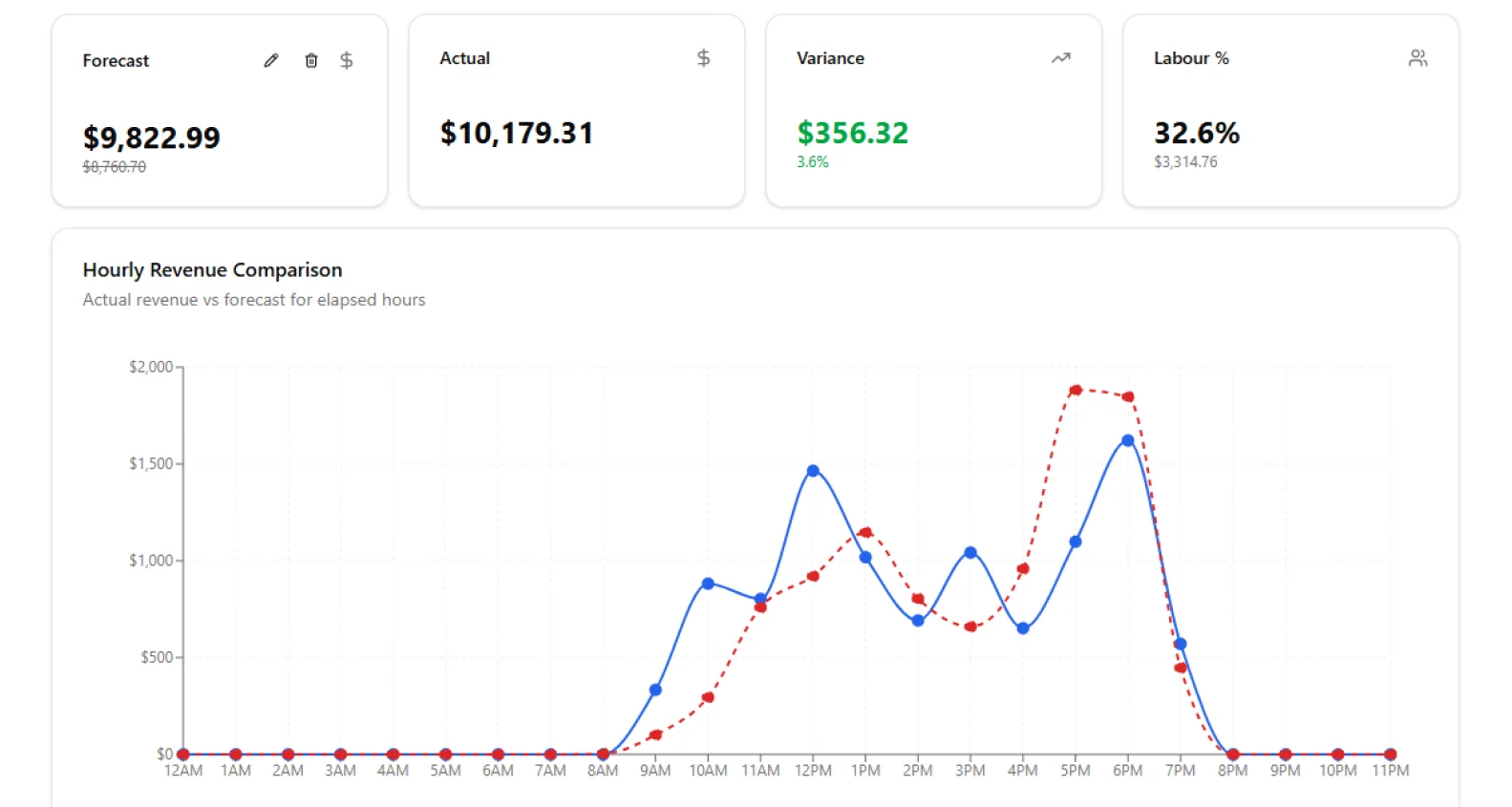
Worksauce prices both the roster and the timesheets. The daily view charts rostered against actual wages for every hour, so you can tell a slow hour from an overstaffed one.
- ✓Hourly charts of sales against forecast, and of rostered against actual wages and hours
- ✓Every shift’s rostered hours, actual hours and cost
- ✓New sales from Square or Lightspeed every five minutes
| Shift | Section | Rostered | Actual | Variance | Cost |
|---|---|---|---|---|---|
| Mia L. | Counter | 6.0 h | 6.5 h | +0.5 h | $162 |
| Ari T. | Drive-thru | 5.0 h | 5.0 h | 0.0 h | $118 |
| Ben O. | Delivery | 4.0 h | 4.75 h | +0.75 h | $104 |
| Section | Sales | Labour | Labour % | Target |
|---|---|---|---|---|
| Counter | $4,180 | $1,003 | 24.0% | 25% |
| Drive-thru | $3,260 | $750 | 23.0% | 22% |
| Delivery | $1,940 | $562 | 29.0% | 26% |
| Total | $9,380 | $2,315 | 24.7% |
A labour target for each part of the store.
The counter, the drive-thru and delivery don’t run at the same labour %, so each section gets its own target as a share of sales. In the daily view, a section’s labour % shows green while it’s on target and red once it’s more than a point over. In labour forecasting, you can give a section a different target for one week.
What a shift costs, and the sales it should bring in.
Junior rates and on-costs, counted in.
Where a role is paid at the Award rate, Worksauce prices each shift from the Award’s rate tables, which step up with age. Super, leave, insurance and payroll tax go on top, at the rates you set for each store.
Roster next week to a forecast.
For each day, Worksauce suggests a sales figure from the same weekday over the last five weeks. You set the forecast, and Worksauce spreads it across the hours using the store’s own trading pattern. Each hour on the roster then has a sales number to answer to.
Want to check what you paid against the Award, too? That’s Award compliance.
Every store you own, under one login.
-
Each store on its own
Every store keeps its own sections, targets and forecast, in its own state and time zone. When the franchisor asks for labour %, the weekly view has it for each day.
-
Stores added together
Tick several stores to see their sales, wages and labour % as one total for the day or the week.
-
Managers on their own store
Give a store Manager their own store’s figures and no one else’s. Owners see every store.
Questions from quick service and franchise Owners
More on connecting your systems, setup and your data in the FAQ, or ask us.
What do I need to connect?
Your point of sale and your rostering system. Sales come from Square or Lightspeed O-Series, and rosters and timesheets from Tanda, Deputy or Employment Hero. Without one of those point-of-sale systems, you can upload sales as a CSV file.
How up to date is today’s labour %?
Worksauce checks Square and Lightspeed for new sales every five minutes. Deputy and Tanda tell Worksauce when a shift or timesheet changes, so a shift’s actual hours come in as soon as the staff member clocks off.
Does labour cost include junior rates?
Yes, for roles paid at the Award rate. Worksauce prices those shifts from the Award’s rate tables, which step up with age. A role on a set hourly rate is costed at that rate, and super, leave, insurance and payroll tax are added at the percentages you set for each store.
Can the kitchen and the counter have different labour targets?
Yes. Each section of a store has its own labour target as a share of sales, and the daily view colours each section’s labour % against it. In labour forecasting, you can give a section a different target for one week.
Can a store Manager see only their own store?
Yes. You choose what each person can see, store by store, so a Manager can be given their own store’s figures only. Owners see every store.
Does Worksauce forecast sales?
It suggests a figure for each day from the same weekday’s sales over the last five weeks, and you set the forecast. Worksauce then spreads it across the hours using the store’s own trading pattern.
See your own numbers.
We'll walk you through it with your own Award and your own systems in mind.
By submitting you agree to our Privacy Policy.