Find the venue that blew its wage budget before the P&L does.
Worksauce reads sales from each venue’s POS and hours from your rostering system. Every venue’s forecast, labour cost and labour % sit side by side, a column for each day, with the group total underneath.
The group total looked fine. Richmond didn’t.
How it goes now
- Tuesday
Richmond has a quiet day. The roster was written last week, so the full team works it.
- Month end
Sales sit in each venue’s POS, hours in the rostering system, wages in payroll.
- Two weeks later
The P&L shows wages up across the group. Someone spends a Monday in a spreadsheet to find it was Richmond, on Tuesdays.
With Worksauce
- Tuesday afternoon
Richmond’s daily view has sales under forecast and wage % climbing, hour by hour.
- Wednesday morning
Forecasting › Labour puts Richmond’s Tuesday labour at 37% of forecast sales. Fitzroy and St Kilda sat near 27%.
- Before next Tuesday
The section breakdown shows which part of Richmond it was, and you change the roster.
Then find which part of the venue it was.
Pick several venues on the Weekly dashboard and the section breakdown lists each section at each venue, so Floor · Richmond sits under Kitchen · Richmond. Open Labour % and the one that ran high stands out.
- ✓Compare with the prior week or the same week last year
- ✓Labour in dollars or in hours
- ✓Actuals for the days gone and the roster for the rest of the week
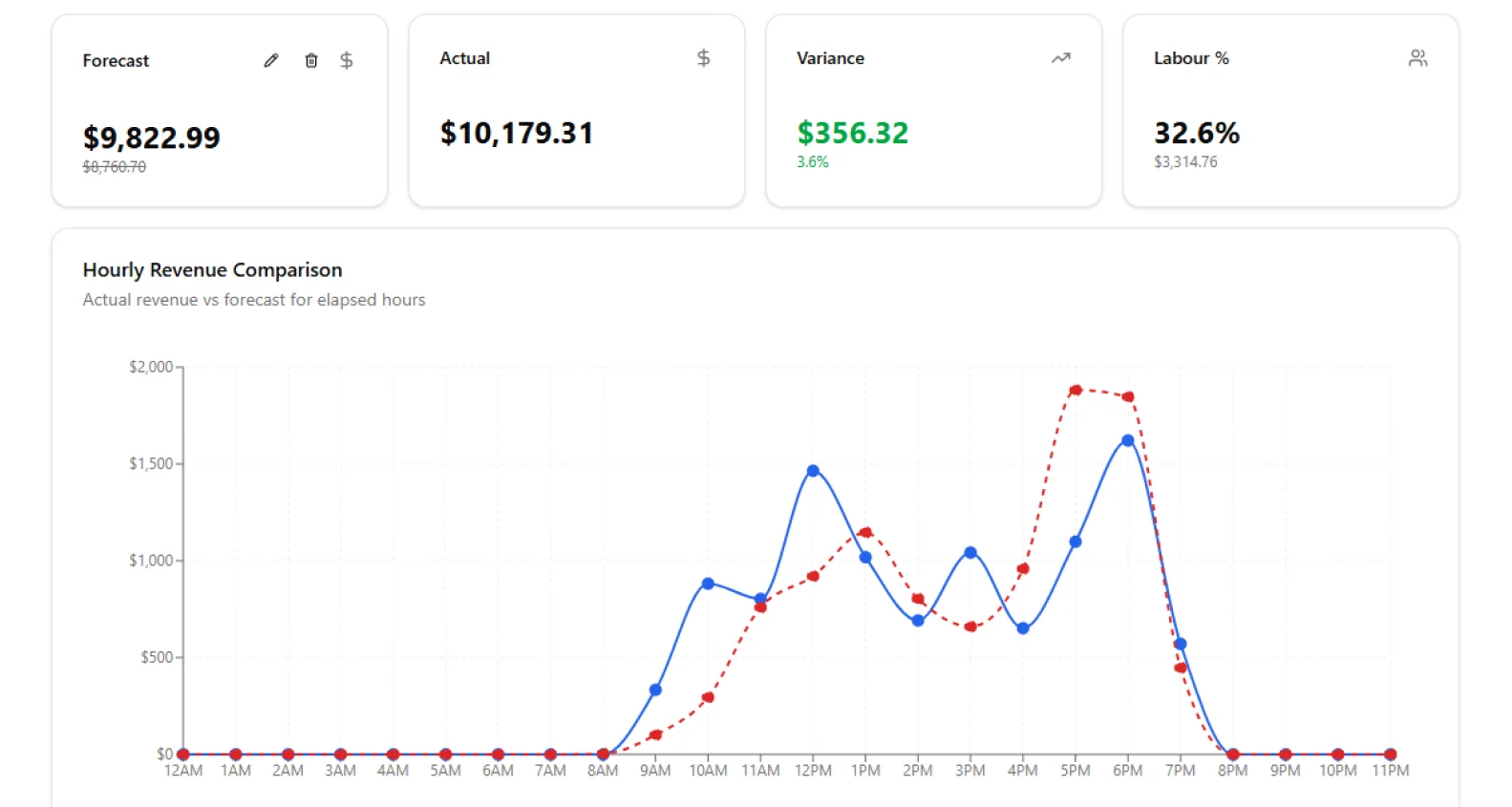
Each venue’s day, hour by hour.
Sales come in from the POS every five minutes and land next to that hour’s forecast. Labour shows as a share of sales, so a slow afternoon shows up while it’s still the afternoon.
- ✓A suggested forecast from the last five of the same weekday, which you can change
- ✓Revenue, wages, hours and wage % for every hour
- ✓A target for each section as a percentage of sales, shown green, amber or red
A P&L for the week while it’s still the week.
Forecasting › Profit/Loss takes sales and labour for the venues you pick and adds the rest. Cost of goods comes off at the percentage you set for each sales category. Operating costs are the ones you enter, and fixed costs are spread across the days by sales.
The month-end P&L tells you about Tuesday a month later. This tells you on Wednesday. Switch to Scheduled to see the rest of the week from the forecast and the roster.
One account for every venue.
-
Access venue by venue
Choose who can see each venue, and which parts of Worksauce they can use there. A venue Manager can have their own venue and nothing else. Owners and admins see every venue.
-
Your systems, matched to venues
Each POS location and each rostering area is matched to one venue. A venue can upload its sales as a CSV file instead.
-
Each venue in its own state
Every venue has its own state and time zone, so a Perth venue’s day runs on Perth time.
Questions from multi-venue groups
More on connecting your systems, setup and your data in the FAQ, or ask us.
Can I see every venue on one screen?
Yes. Forecasting › Labour shows each venue’s forecast, labour cost and labour % for every day of the week, with a total for the venues you pick. The Weekly dashboard adds them together and breaks labour down by section at each venue.
Can a venue Manager see only their own venue?
Yes. You give each person access venue by venue, and choose which parts of Worksauce they can use at each one. Owners and admins see every venue.
Which systems do our venues need?
Sales from Square or Lightspeed, and rosters and timesheets from Tanda, Deputy or Employment Hero. Each POS location and rostering area is matched to one of your venues, and a venue can upload its sales as a CSV file instead.
Can I set a labour target for each venue?
You set targets for each section inside a venue, such as kitchen or floor, as a percentage of sales, and you can change them for a given week. There’s no single target for a whole venue. The daily view shows each section green, amber or red against its target.
How current are the numbers?
Sales come in from your POS every five minutes. Tanda and Deputy send roster and timesheet changes as they happen, and Employment Hero comes in on a scheduled sync. Today’s dashboard refreshes every minute.
Does Worksauce forecast our sales?
It suggests each day’s sales from the last five of the same weekday, skipping public holidays, for each sales category. You can change the forecast for the day or hour by hour.
See your own numbers.
We'll walk you through it with your own Award and your own systems in mind.
By submitting you agree to our Privacy Policy.