You do the payroll after close. Nobody checks it against the Award.
Worksauce reads your timesheets and pay runs, works out what each staff member should have been paid under the Award and shows you any gap. Penalty rates, casuals and split shifts are included, every pay run, so you don’t have to check payslips line by line.
| Employee | Period | Reason | Gap |
|---|---|---|---|
| Priya N. | 15–21 Sep | Sunday penalty rate | −$36.48 |
| Leah M. | 15–21 Sep | Overtime after 38 hours | −$12.10 |
| Tom W. | All periods | Higher duties on weekends | Checked |
| Sam K. | All periods | — | $0.00 |
One restaurant can’t absorb a back-pay bill.
-
Penalty rates change through the week
Saturday, Sunday, public holidays, late finishes. The rate depends on the day, the hour and the staff member, and one wrong setting repeats every week.
-
Casuals, split shifts and juniors
A casual sent home after an hour, a lunch-and-dinner split, a junior who turned 18 last month. Each has its own rule, and payroll only gets it right if it was set up right.
-
No time to check, no room for a bill
You fit payroll in between service and close. If an underpayment turns up years later, the back pay comes out of the same account as the rent.
The rules restaurants most often get wrong, checked every pay run.
Worksauce works out each shift under the Award you confirm for each staff member, the Restaurant Industry Award or the Hospitality Industry (General) Award, and compares it with what payroll paid.
-
Weekend and public holiday rates
Saturday, Sunday and public holiday penalties, with public holidays for your state.
-
Late finishes and early starts
The extra the Award adds for weeknight work late in the evening and before the morning.
-
Split shifts
The split shift allowance for full-time and part-time staff whose day is broken by a long gap between lunch and dinner.
-
Casuals
Casual loading on every casual shift, and short shifts that should have been paid up to the minimum.
-
Juniors
Junior rates for each staff member’s age on the day, so a birthday partway through a pay period is picked up.
-
Overtime and late meal breaks
Daily and weekly overtime, and every shift where a late meal break attracts a penalty.
How the Awarditor checks your pay
From your systems to a report in four steps. After that, every pay run is checked as it lands.
Onboarding
Connect your systems and confirm each staff member's Award and classification.
Calculation
Every shift costed against the Award: penalties, overtime, allowances, breaks.
Reconciliation
Calculated against paid, by person and by pay period.
Management
Back-pay worked out, and checks on every pay run from then on.
Set up in a conversation, not a 40-field Excel
Worksauce reads your staff from the systems you already use and proposes an Award, classification, employment type and allowances for each one. You check the list and correct whatever looks off, in plain English.
- ✓Connect rostering, payroll and accounting in a few clicks
- ✓Review suggestions person by person
- ✓Get your first compliance report the same day
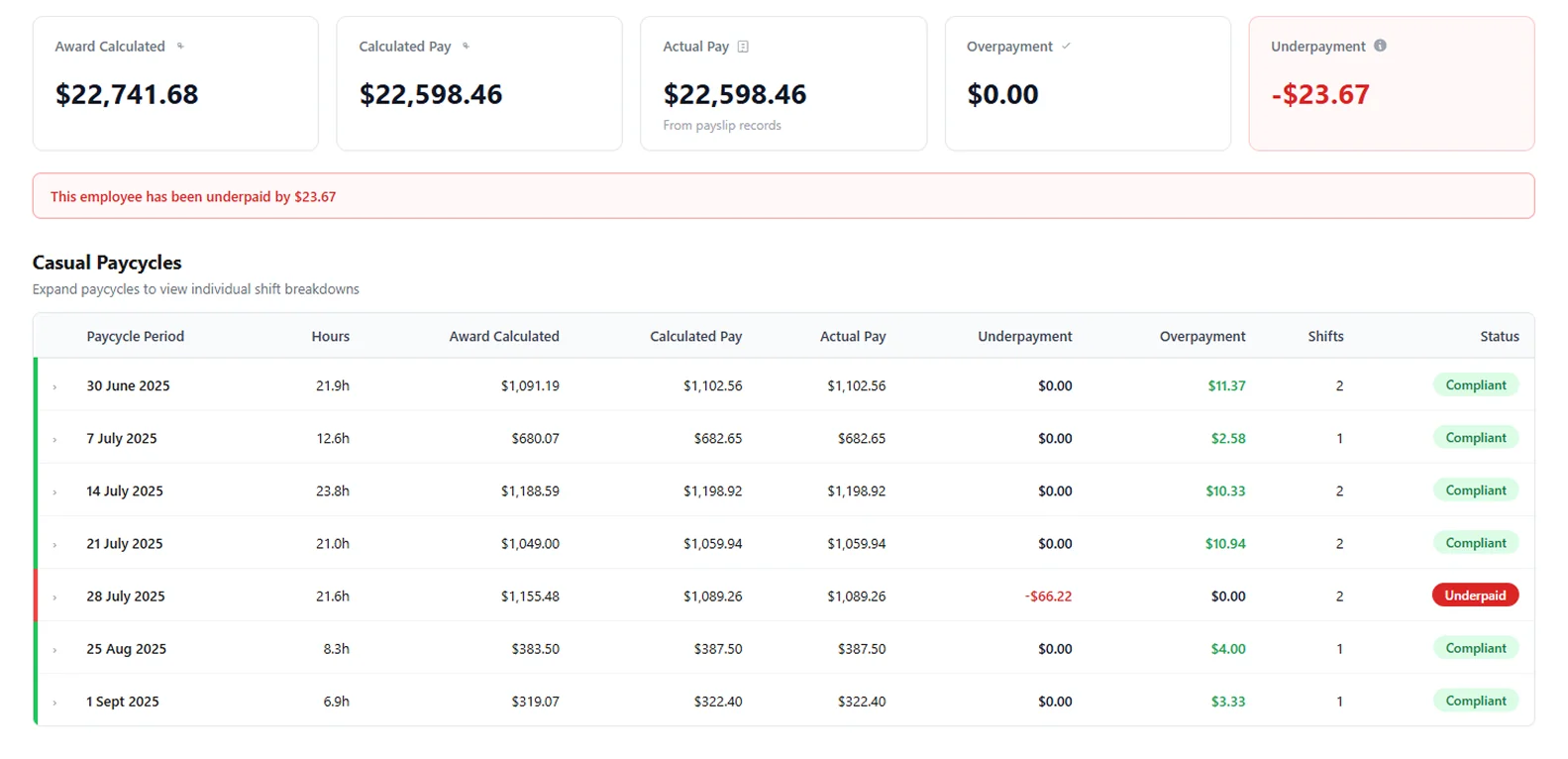
See which pay cycle was short, and why.
Open a staff member to see each pay cycle: hours worked, what the Award calculates, what was actually paid and the difference. Open a pay cycle to see the shifts behind it, so you fix the setting in payroll, not just one payslip.
- ✓Each shift checked against the rates in force on the day it was worked
- ✓Overpayments shown too, so you can see what playing it safe is costing
- ✓Back pay worked out and ready to export for your accountant
For the Owner who signs off the pay, and the Manager who writes the roster.
Know your pay is right.
See what’s owed, to whom and since when, before anyone else finds it. If a notice to produce arrives, the report is ready to export.
See what each shift cost.
See what each shift cost under the Award: the Sunday rate, the late finish, the split between lunch and dinner. Then write next week’s roster knowing what a Sunday costs.
Questions from restaurant Owners
More on connecting your systems, setup and your data in the FAQ, or ask us.
Which Award does it check my staff against?
The one you confirm for each staff member. Worksauce checks pay under the Restaurant Industry Award and the Hospitality Industry (General) Award. During setup it suggests an Award and classification for each person, and you confirm or correct them.
Does it check split shifts?
Yes. Where the Award pays full-time and part-time staff a split shift allowance, Worksauce works out how many are owed for the day under that Award’s rules and checks they were paid.
What about casual and junior staff?
Worksauce checks casual loading on every casual shift. It works out junior rates from each staff member’s date of birth in your payroll or rostering system, for their age on the day of each shift.
Does it pick up the Award increase every 1 July?
Yes. Worksauce keeps each Award rate with the date it took effect, and checks every shift against the rates that applied on the day it was worked, before and after the increase.
Do I need to change how I do payroll?
No. You keep running pay in Tanda, Employment Hero or Xero, and rosters and timesheets in Tanda, Deputy or Employment Hero. Worksauce reads them and checks each pay run.
What happens if it finds an underpayment?
You see who was underpaid, by how much and in which pay periods, with the Award calculation for each shift behind the figure. Worksauce works out the back pay and exports the report in CSV or Excel. You make the payment through your own payroll.
See your own numbers.
We'll walk you through it with your own Award and your own systems in mind.
By submitting you agree to our Privacy Policy.