Junior rates change with every birthday. Does your payroll keep up?
Worksauce works out what each staff member should have been paid under the Fast Food Industry Award, from their age on the day, their employment type and the hours they worked, and compares it with what payroll paid. Every pay run, for every store you run.
| Employee | Period | Reason | Gap |
|---|---|---|---|
| Priya N. | 15–21 Sep | Sunday penalty rate | −$36.48 |
| Leah M. | 15–21 Sep | Overtime after 38 hours | −$12.10 |
| Tom W. | All periods | Higher duties on weekends | Checked |
| Sam K. | All periods | — | $0.00 |
A young, casual team gives pay more ways to go wrong.
-
Junior rates move with every birthday
Under the Fast Food Industry Award, staff under 21 are paid a percentage of the adult rate set by their age. Miss a birthday in payroll and every shift after it is paid at the wrong rate.
-
New starters every month
High turnover, casuals on short shifts, late closes on weeknights. Every new starter is another classification or setting that can be wrong from the first shift.
-
Franchises get scrutiny from two sides
Under the Fair Work Act, a franchisor can be held responsible for a franchisee’s underpayments if it knew, or should reasonably have known, and didn’t take reasonable steps to prevent them. Expect questions from your franchisor as well as the Fair Work Ombudsman.
Checked against the Fast Food Industry Award, shift by shift.
Worksauce checks each staff member against the Award and classification you confirm during setup, using their hours from your rostering system and their pay from payroll.
-
Junior rates
Worked out from each staff member’s date of birth, for their age on the day of each shift, so a birthday mid pay period is picked up.
-
Casual loading
On every casual staff member’s ordinary hours.
-
Minimum shift length
Casual and part-time shifts shorter than the Award’s minimum, and whether they were paid up to it.
-
Late nights and early mornings
The weeknight penalties for work after 10pm and before 6am.
-
Weekends and public holidays
Saturday, Sunday and public holiday rates, with the Sunday rate set by each staff member’s level.
-
Overtime
Daily and weekly overtime, for juniors, adults and casuals.
How the Awarditor checks your pay
From your systems to a report in four steps. After that, every pay run is checked as it lands.
Onboarding
Connect your systems and confirm each staff member's Award and classification.
Calculation
Every shift costed against the Award: penalties, overtime, allowances, breaks.
Reconciliation
Calculated against paid, by person and by pay period.
Management
Back-pay worked out, and checks on every pay run from then on.
Set up in a conversation, not a 40-field Excel
Worksauce reads your staff from the systems you already use and proposes an Award, classification, employment type and allowances for each one. You check the list and correct whatever looks off, in plain English.
- ✓Connect rostering, payroll and accounting in a few clicks
- ✓Review suggestions person by person
- ✓Get your first compliance report the same day
All your stores, in one report.
Each store has its own state and time zone. One report covers every store in your business, with underpayments and overpayments by store. Open a staff member to see each pay cycle and the shifts behind it.
- ✓Classification changes applied from the date they took effect
- ✓Overpayments shown too, so you can see what playing it safe is costing
- ✓Exports in CSV or Excel for your franchisor, your accountant or an auditor
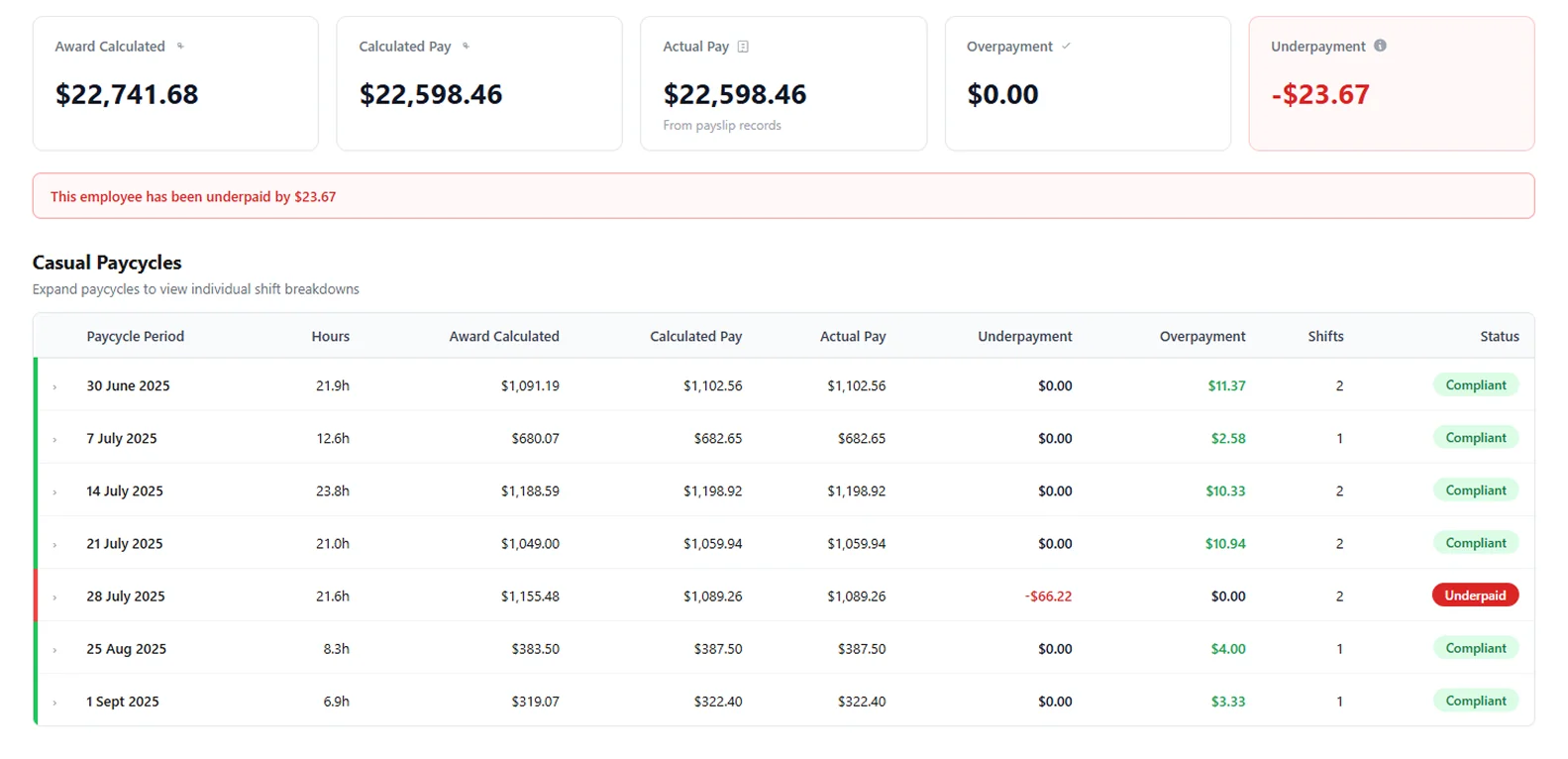
For the franchisee who signs off the pay, and the store Manager who writes the roster.
Show your pay is right.
See what’s owed across your stores, to whom and since when. Export the report when your franchisor, your accountant or the Fair Work Ombudsman asks for it.
Catch it at the next pay run.
See which staff member, which shift and which rule: a junior rate after a birthday, a casual shift paid short of the minimum, a late close on a weeknight. Fix the setting before the next pay run.
Questions from quick service and franchise operators
More on connecting your systems, setup and your data in the FAQ, or ask us.
Does it check junior rates?
Yes. Worksauce works out each staff member’s age on the day of every shift from the date of birth in your rostering or payroll system, and checks the junior rate the Award sets for that age.
Which Award does it use?
The one you confirm for each staff member, usually the Fast Food Industry Award for quick service. During setup Worksauce suggests an Award and classification for each person, and you confirm or correct them.
Does it check allowances?
It checks the Fast Food Industry Award’s laundry, cold work and Broken Hill allowances. The Award’s other allowances aren’t checked yet.
Can I check several stores at once?
Yes. One report covers every store in your business, with underpayments and overpayments by store. Each store has its own state and time zone.
Do my staff need to install anything?
No. Worksauce reads your staff from your rostering and payroll systems, so your team doesn’t need an account or an app.
What happens if it finds an underpayment?
You see who was underpaid, by how much and in which pay periods, with the Award calculation for each shift behind the figure. Worksauce works out the back pay and exports the report in CSV or Excel. You make the payment through your own payroll.
See your own numbers.
We'll walk you through it with your own Award and your own systems in mind.
By submitting you agree to our Privacy Policy.