Every venue runs payroll its own way. The notice still comes to you.
Worksauce checks what each staff member at each venue was paid against their Award, every pay run. You see where the group stands, which venues have gaps and the back pay owed, before the Fair Work Ombudsman asks.
| Employee | Period | Reason | Gap |
|---|---|---|---|
| Priya N. | 15–21 Sep | Sunday penalty rate | −$36.48 |
| Leah M. | 15–21 Sep | Overtime after 38 hours | −$12.10 |
| Tom W. | All periods | Higher duties on weekends | Checked |
| Sam K. | All periods | — | $0.00 |
The more venues you run, the harder it is to see what’s owed across them.
-
Each venue set up payroll differently
Venues opened or were bought at different times and set up by different Managers. Classifications and pay settings drifted apart, and nobody has compared them since.
-
Small gaps repeat across the group
A missed Sunday rate costs one staff member a few dollars a shift. Copied across venues and repeated every pay run for years, it becomes a back-pay bill for the whole group.
-
The director is the one accountable
A notice to produce asks for time and wage records across the business. The Managers who set up payroll may have moved on. The Owner or director still answers for it.
One set of Award rules, applied the same way at every venue.
Each venue keeps its own state and time zone, and Worksauce applies the same Award rules to every shift at every venue. When it reports a gap, the gap is in what was paid.
-
Weekends and public holidays
Saturday, Sunday and public holiday rates, with public holidays taken from the state each venue is in.
-
Evenings and early mornings
The extra the Award adds for work late at night and early in the morning on weekdays.
-
Casuals and juniors
Casual loading, and junior rates for each staff member’s age on the day they worked.
-
Overtime and split shifts
Daily and weekly overtime, the break between shifts, and the split shift allowance for full-time and part-time staff.
-
Minimum engagement
Short shifts that the Award says must be paid up to a minimum number of hours.
-
Late meal breaks
Every shift where a meal break came late enough to attract a penalty, in a report of its own.
How the Awarditor checks your pay
From your systems to a report in four steps. After that, every pay run is checked as it lands.
Onboarding
Connect your systems and confirm each staff member's Award and classification.
Calculation
Every shift costed against the Award: penalties, overtime, allowances, breaks.
Reconciliation
Calculated against paid, by person and by pay period.
Management
Back-pay worked out, and checks on every pay run from then on.
Set up in a conversation, not a 40-field Excel
Worksauce reads your staff from the systems you already use and proposes an Award, classification, employment type and allowances for each one. You check the list and correct whatever looks off, in plain English.
- ✓Connect rostering, payroll and accounting in a few clicks
- ✓Review suggestions person by person
- ✓Get your first compliance report the same day
See which venues the gaps are in.
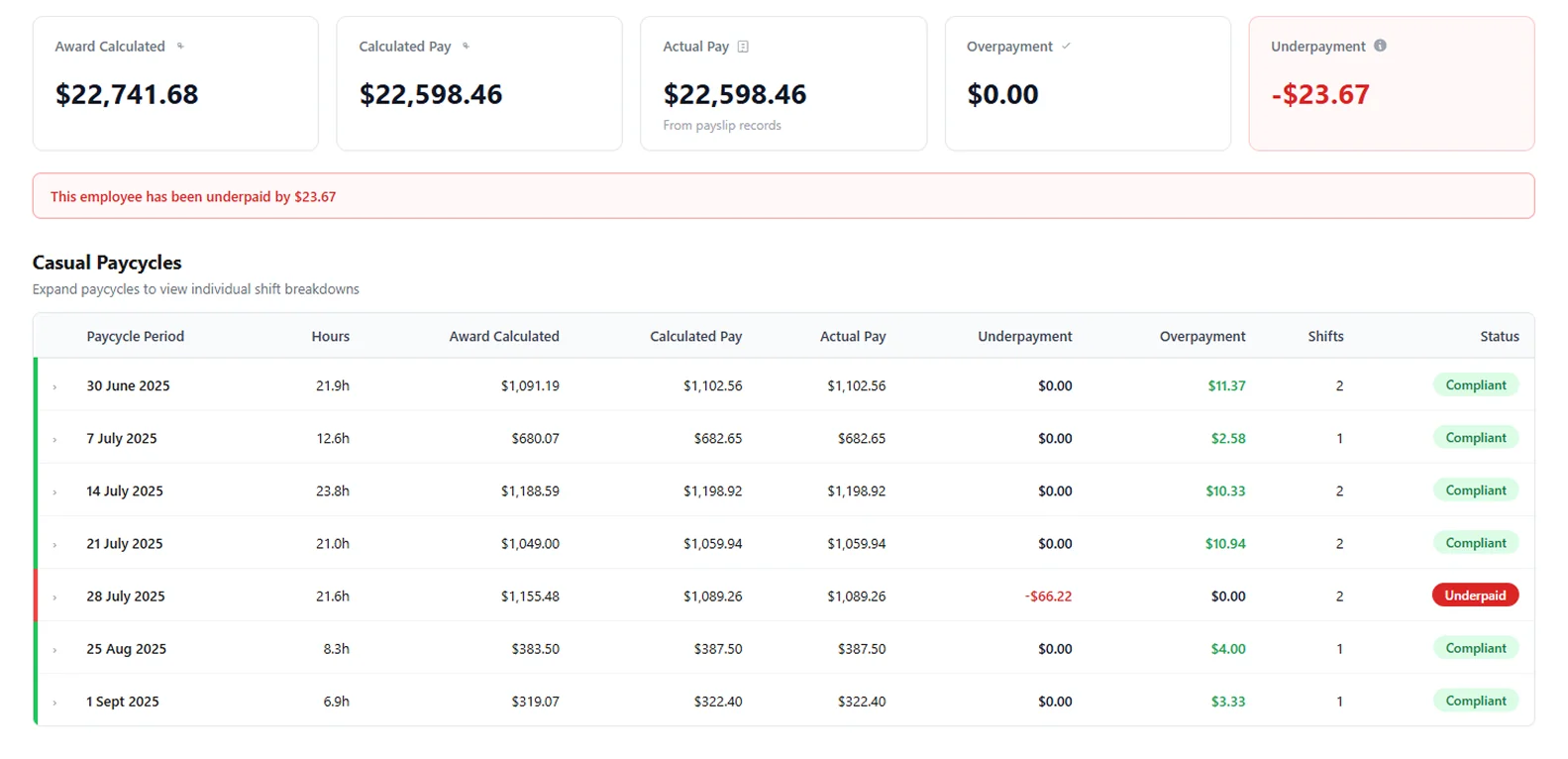
One report covers every venue, with underpayments and overpayments by venue and the biggest first. Filter to one venue or a few, then open a staff member to see each pay cycle and the shifts behind it.
- ✓Underpayments and overpayments kept apart, so one staff member’s overpayment doesn’t hide another’s underpayment
- ✓Public holidays for the state each venue is in
- ✓Exports in CSV or Excel for your accountant, an auditor or a buyer’s due diligence
For whoever answers for the group, and whoever fixes the pay runs.
Know the group’s position.
See what’s owed across every venue, to whom and since when, with the calculation behind each figure. If a notice arrives, the report is ready to export.
Fix it before the next pay run.
See which staff member, which shift and which rule: a Sunday rate, a split shift, a casual shift paid short of the minimum. Change the setting in payroll before it repeats at the next venue.
Questions from multi-venue groups
More on connecting your systems, setup and your data in the FAQ, or ask us.
Can I see Award compliance across all my venues at once?
Yes. One report covers every venue in your business, with underpayments and overpayments shown by venue. You can also narrow it to one venue or a few.
Our venues are in different states. Does that matter?
No. Each venue has its own state and time zone, and Worksauce uses the public holidays of the state each shift was worked in. You can add a venue’s regional public holidays too.
Which hospitality Awards does it check?
The Hospitality Industry (General) Award, the Restaurant Industry Award and the Fast Food Industry Award. During setup Worksauce suggests an Award and classification for each staff member, and you confirm or correct them.
Does it show overpayments too?
Yes. Worksauce counts overpayments separately from underpayments, so one staff member paid over the Award doesn’t cancel out another paid under it.
Does it pick up the Award increase every 1 July?
Yes. Worksauce keeps each Award rate with the date it took effect, and checks every shift against the rates that applied on the day it was worked, before and after the increase.
What happens if it finds an underpayment?
You see who was underpaid, by how much and in which pay periods, with the Award calculation for each shift behind the figure. Worksauce works out the back pay and exports the report in CSV or Excel. You make the payment through your own payroll.
See your own numbers.
We'll walk you through it with your own Award and your own systems in mind.
By submitting you agree to our Privacy Policy.